MCPProxy
A smart proxy for AI agents using the Model Context Protocol (MCP)
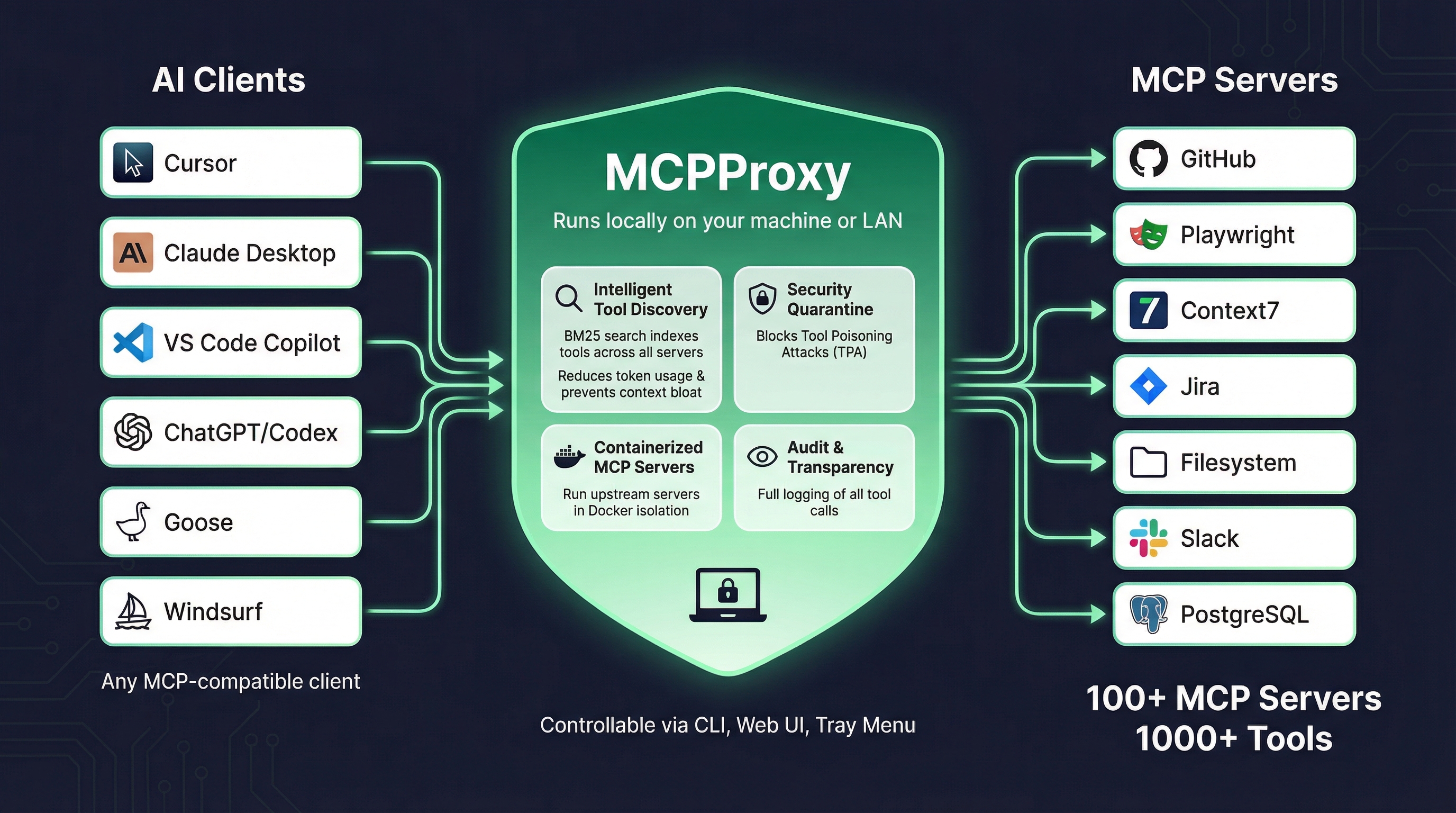
What is MCPProxy?
MCPProxy is a Go-based application that acts as an intelligent proxy between AI clients (like Cursor, Claude Desktop, VS Code Copilot) and MCP servers. It runs locally on your machine or LAN and provides:
- Intelligent Tool Discovery - BM25 search indexes tools across all connected servers, reducing token usage and preventing context bloat
- Security Quarantine - Blocks Tool Poisoning Attacks (TPA) by quarantining new servers until manually approved
- Containerized MCP Servers - Run upstream servers in Docker isolation for enhanced security
- Audit & Transparency - Full logging of all tool calls for debugging and compliance
Key Features
Intelligent Tool Discovery
Instead of loading all tools from all servers into your AI client's context, MCPProxy indexes tools using BM25 search. Your AI client queries for relevant tools and only receives what it needs, dramatically reducing token usage.
Security Quarantine
New MCP servers are automatically quarantined until you review and approve them. This protects against Tool Poisoning Attacks where malicious servers might try to manipulate AI behavior through crafted tool descriptions.
Docker Isolation
Run MCP servers inside Docker containers with automatic runtime detection (Python/Node.js), environment variable passing, and proper container lifecycle management.
Multiple Control Interfaces
MCPProxy is controllable via:
- CLI - Full command-line interface for scripting and automation
- Web UI - Browser-based dashboard for visual management
- Tray Menu - System tray application for quick access (macOS/Windows/Linux)
Architecture
MCPProxy consists of two components:
- Core Server (
mcpproxy) - Headless HTTP API server with MCP proxy functionality - Tray Application (
mcpproxy-tray) - Optional GUI that manages the core server
The core server binds to 127.0.0.1:8080 by default (localhost-only for security) and can be configured for LAN access if needed.
Getting Started
Ready to get started? Follow the Installation Guide to install MCPProxy on your system, then proceed to the Quick Start guide to configure your first MCP servers.
Ecosystem
MCPProxy works with any MCP-compatible client and connects to 100+ MCP servers providing 1000+ tools. Popular integrations include:
AI Clients:
- Cursor
- Claude Desktop
- VS Code Copilot
- ChatGPT/Codex
- Goose
- Windsurf
MCP Servers:
- GitHub
- Playwright
- Context7
- Jira
- Filesystem
- Slack
- PostgreSQL
- And many more...